Services
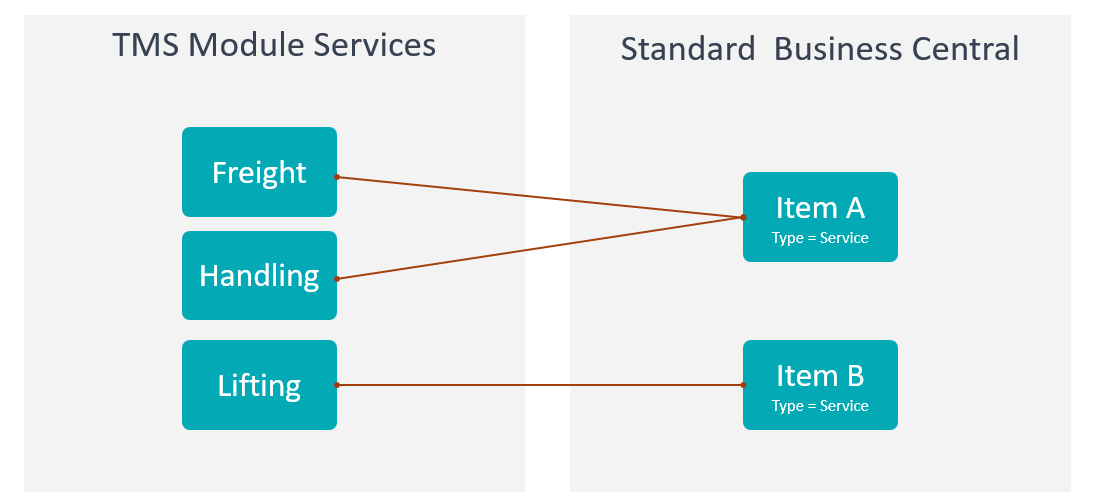
Use Services to define what your company charges customers for.
Services are the income side of settlement. Charges are the cost side.
Before you start
Make sure that:
- Business Central posting setup exists for customer invoicing,
- service descriptions are agreed with finance and operations,
- pricing rules are configured if services should receive automatic prices,
- users know which services are standard and which are exception services.
How to create a service
- Search for Services.
- Choose New.
- Enter a code and description.
- Fill posting, tax, unit, and pricing defaults when required.
- Mark the service blocked only when it should no longer be used.
- Test the service on a settlement income line.
Fields that matter most
| Field | Why it matters |
|---|---|
| Code | Identifies the service on settlement lines. |
| Description | Appears on invoices and internal reports. |
| Posting mapping | Controls customer invoice creation. |
| Unit of Measure | Controls quantity and price interpretation. |
| Blocked | Prevents new use while preserving history. |
Where services are used
| Area | Use |
|---|---|
| Settlement income lines | Defines what the customer is billed for. |
| Default Service Sets | Predefines services or charges together with their Financial Effect and Pricing Mode for new Forwarding Orders. |
| Pricing | Finds or calculates expected income. |
| Sales documents | Creates customer invoice or credit memo lines. |
| Reporting | Shows revenue by service. |
Good to know
- Use clear invoice-friendly descriptions.
- Do not mix services and charges. Services are income. Charges are cost.
- In a Default Service Set, choose Standard or Credit Financial Effect and Per Unit or Fixed Amount Pricing Mode before the set is used by a Forwarding Order Type.
- Lines copied from a Default Service Set remain editable Settlement drafts until they are linked to a document.
- Before invoicing, follow Add an Income line. Unit of Measure Code must be filled on every Income line, including fixed fees and services mapped to a G/L account or resource.
- Block obsolete services instead of deleting them.
Troubleshooting
| Problem | What to check |
|---|---|
| Service cannot be selected | Check whether the service is blocked. |
| Invoice line is wrong | Review service description, posting mapping, quantity, price, and tax setup. |
| Price is missing | Check pricing setup, customer, agreement, currency, and validity dates. |
| User cannot create invoice | Check settlement status, permissions, and TMS Setup. |