Products
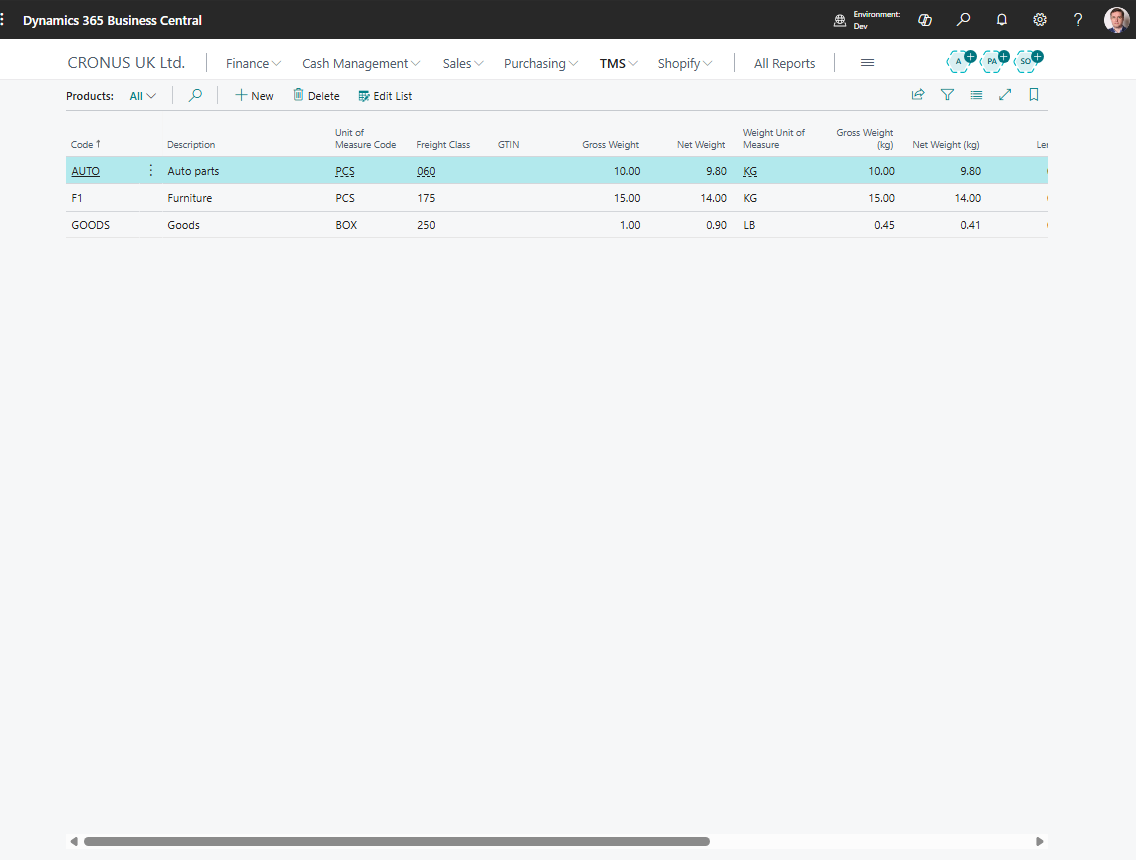
Use Products to maintain reusable cargo descriptions for Forwarding Order content.
A product can represent a generic cargo type, commodity, or item description used by operations and documents.
Before you start
Make sure that:
- users agree which cargo descriptions should be standardized,
- logistic unit types exist when products are normally moved in standard units,
- any required weight, volume, or classification data is known.
How to create a product
- Search for Products.
- Choose New.
- Enter a code and description.
- Fill weight, volume, unit, or classification details when used.
- Save the product.
- Select the product on Forwarding Order content lines when applicable.
Fields that matter most
| Field | Why it matters |
|---|---|
| Code | Identifies the product in content lines and reporting. |
| Description | Prints or appears as cargo text. |
| Unit data | Helps calculate totals and documents. |
| Weight / Volume | Supports planning and settlement review. |
| Blocked | Prevents new use while preserving history. |
| Transport Profile Count / Has Transport Profiles | Shows unblocked profile assignments for this Product. These indicators do not confirm that an assignment is current or that its Profile is reviewed and suitable for a particular Stage. |
Set up transport requirements for Products and Items
Use Transport Profile Assignments when cargo needs controlled dangerous-goods classification, packaging, temperature, or equipment requirements. The classification is maintained in a reusable Transport Profile, then linked to the cargo; it is not copied into the Product or Item.
| Cargo record | Where to open assignments | Supported scope |
|---|---|---|
| TMS Product | Select a record in Products, then choose Transport Profiles. | Product and optional Unit of Measure. Variant Code must remain blank. |
| Business Central Item | Open Item Card or select a record in Items, then choose Transport Profiles. | Item, optional Item Variant, and optional Item Unit of Measure. |
The Item Card also shows Transport Profile Count and Has Transport Profiles in Transportation Management System > Transport Profiles, after the Warehouse section. The Items list shows the count; the presence indicator is available through personalization. These indicators count unblocked assignments only, regardless of dates, review state, or transport context.
Assign a Profile
- Ask the responsible transport administrator to create and review the applicable Transport Profiles. Use a separate Profile when the Mode, Regulation, package, bulk, shipping state, or temperature scenario differs.
- Open Transport Profiles from the Product or Item. The assignment list is filtered to that cargo record.
- Add a row and select Transport Profile Code. The Profile must be unblocked. An unreviewed Profile can be assigned during setup, but cannot be selected on a Stage until its transport data is reviewed.
- For an Item, enter Variant Code if the assignment is specific to a variant. Enter Unit of Measure Code when the scenario applies to a particular unit. An Item unit must already exist in that Item’s units of measure; a Product unit comes from the general units of measure.
- Leave Variant or UOM blank only when the assignment is a valid fallback for other variants or units.
- Set Default and Priority to order eligible candidates. Higher priority values rank first; these fields do not override eligibility or automatically choose between several candidates during Stage selection. Dangerous Goods Bill of Lading uses a unique best rank to select each cargo profile automatically; see Transport Profiles.
- Set Effective From and Effective To when needed. Both limits are inclusive; blank means no limit. The selection date is the Stage’s Start DateTime, otherwise the Forwarding Order Document Date, otherwise the current Work Date.
- Use assignment Blocked to disable this cargo-to-Profile link, and Comment to explain its purpose. Blocking an assignment does not block the Profile for other cargo.
- On a representative Forwarding Order with direct Item or Product content lines, set the Stage context, choose Suggest Transport Profile, and run Check Transport Profile. See Stages for the daily planning process.
You can also maintain assignments centrally through Transport Profile Assignments, or open Assignments on a Transport Profile card to see its cargo links.
How Variant and UOM matching works
For an Item, TMS uses the first group containing eligible Profiles, in this order:
- Exact Variant and exact UOM.
- Exact Variant and blank UOM.
- Blank Variant and exact UOM.
- Blank Variant and blank UOM.
For a Product, exact UOM comes before blank UOM. Eligibility includes assignment dates and blocking, Profile review and blocking, Stage Mode and Regulation, Package Type when specified, and the selected Vehicle Unit Type. A more specific group with no eligible Profiles can fall back to a less specific group.
For example, a fictional Product CARGO-A could have an assignment for UOM DRUM to a reviewed drum Profile and an assignment for UOM BULK to a reviewed bulk Profile. For an Item, a variant can distinguish another product presentation as well. These are setup examples: your administrator must establish the real classification and allowed packaging before approval.
Recommendations for planners and administrators
- Configure every direct Item or Product whose transport scenarios must restrict Stage selection. A line with no relevant assignment does not constrain the suggested Profile and still needs manual assessment.
- A line with relevant assignments that are all unusable produces an error; blocking or expiring its last eligible assignment does not make it unrestricted.
- Keep fallback assignments narrow enough to remain valid for every Variant or UOM they can cover. Use specific rows for packaging or product variations that change transport requirements.
- For several configured cargo lines, a Stage needs a common eligible Profile. The system checks the Forwarding Order’s direct Item/Product lines, not the contents of Logistic Units; separate cargo into different Forwarding Orders when its allowed Profiles cannot be reconciled.
- Recheck affected Stages after changing assignments or Profiles. The presence indicator is a setup aid, not an approval or a shipment compliance result.
Good to know
- Products in TMS are cargo descriptions. They do not replace standard Business Central items unless your process maps them that way.
- Keep product descriptions clear for customers and carriers.
- Use generic products only when detailed item tracking is not required.
Troubleshooting
| Problem | What to check |
|---|---|
| Product is not available | Check whether it is blocked or filtered. |
| Cargo text is wrong on a document | Review the product description and the content line description. |
| Totals are wrong | Check quantity, unit type, weight, and volume on the content line. |
| A Profile is not offered for this cargo | Check the assignment’s Variant/UOM, dates and Blocked value, then the Profile’s review state, blocking, and compatibility with the Stage context. |
| The count is positive, but no Profile is eligible | The count includes unblocked assignments even when expired, not yet effective, or linked to a Profile that is blocked, unreviewed, or unsuitable for this Stage. |